Billing and the cash drawer
Charges, payments and receipts, discounts, HMO billing and claims, packages, money paid out, supplies, and closing the day. Billing is for the front desk and the clinic administrator; clinicians and the nurse do not see it.
The billing page
Billing in the menu.
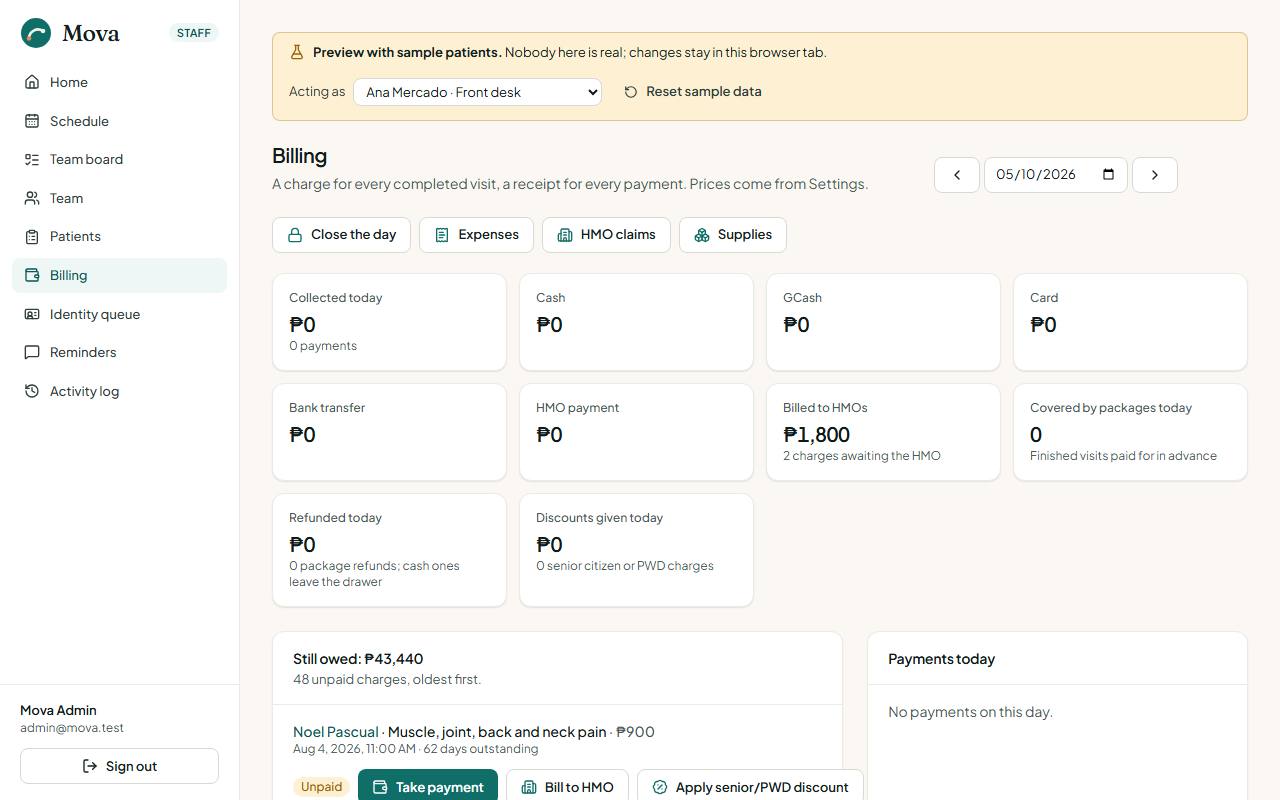
It shows a day at a time: what was collected by method (cash, GCash, card, bank, HMO), the payments of that day with their receipts, the charges created that day, discounts given and visits covered by packages, and everything still owed, oldest first, with payment right there. Links at the top go to HMO claims, Expenses, Supplies and Close the day.
Each patient's record also has a Billing tab with their charges, payments, packages and balance.
Charges
- A charge is made when a session is finished, at the service's current price from Settings.
- Add a charge on the patient's Billing tab for anything else: a brace, a report, a missed-visit fee.
- Waiving: the administrator can waive a charge with a reason. It stays on the record.
Taking a payment
- Find the charge in everything still owed on the billing page, or on the patient's Billing tab, and choose Take payment.
- Enter the amount and the method: cash, GCash, card or bank transfer. GCash, card and bank need the reference number.
- Choose Record payment and issue receipt. The payment gets the next official receipt number.
- Print the receipt. It carries the clinic's business name and TIN, the patient's number, the amount, the method and who took it.
A charge can be paid in parts; the balance stays on the list until it is settled.
Senior citizen and PWD discounts
The 20% discount is applied against the ID the patient shows.
- Record the ID on the patient's details (Senior citizen or PWD, with the ID number). Every charge for a finished visit then carries the discount from the start.
- On an unpaid charge with nothing paid on it yet, the desk can apply the discount there, against the ID shown. The ID is kept on the details too.
- A senior citizen discount needs the patient to be 60 or over.
- A discounted charge cannot be billed to an HMO, and an HMO charge cannot be discounted.
- The administrator can remove a discount, with a reason, while nothing has been paid.
- The receipt shows the list price, the "Less 20%" line with the law and the ID number, the net amount, and a line for the patient or their representative to sign.
- The accountant's record of every discount is in the reports, under Operations and safety.
HMO billing
For patients covered by an HMO, recorded on their details.
- On an unpaid charge, choose to bill it to the HMO. The HMO is filled in from the details; enter the letter of authorisation (LOA) number.
- The charge now waits for the HMO, not the patient. In the portal, the patient sees it as billed to their HMO and it stays out of what they owe.
- When the HMO pays, record a payment with HMO payment as the method and the HMO's reference. A receipt is issued.
HMO claims
HMO claims, from the billing page. Where every charge billed to an HMO stands.
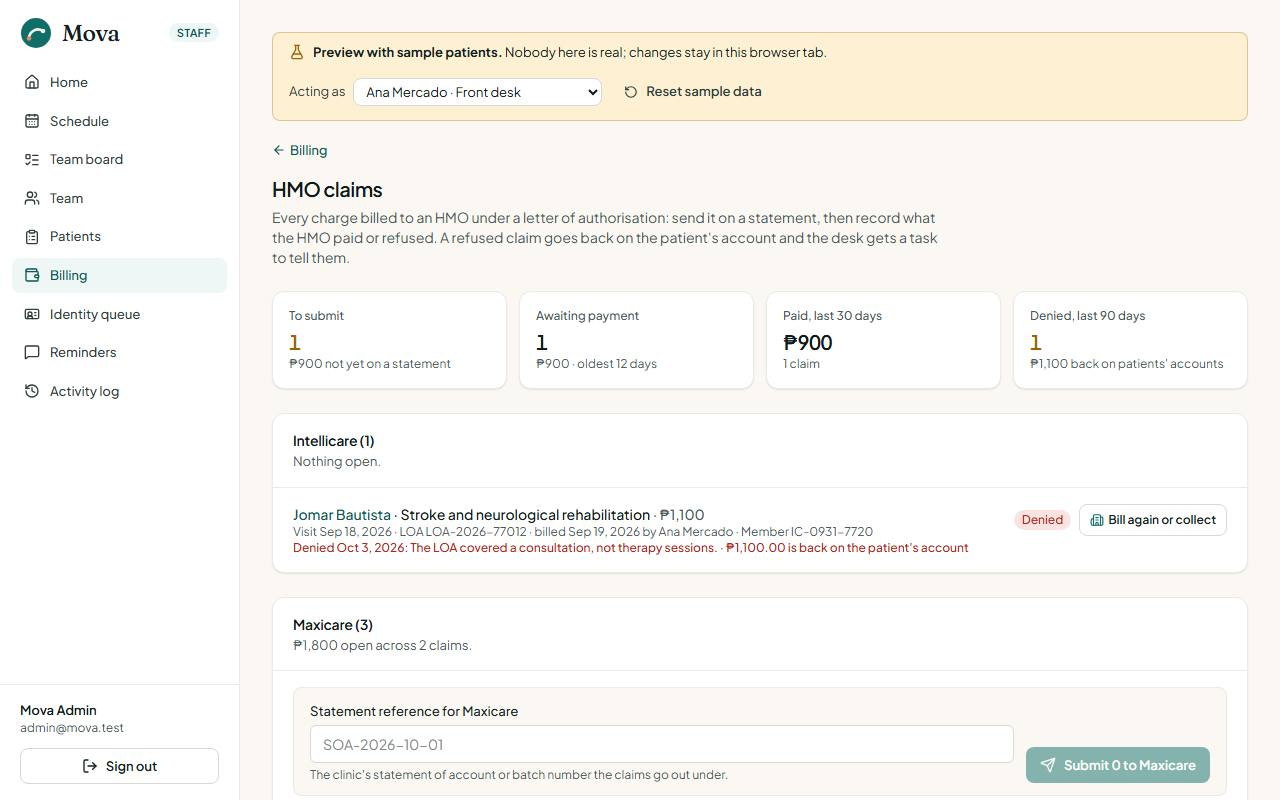
| Stage | Meaning |
|---|---|
| To submit | Billed, not yet sent to the HMO on a statement |
| Submitted | On a statement, waiting for payment, with how many days it has waited |
| Paid | The HMO's payment settled it |
| Denied | The HMO refused it, with their reason |
- Submitting: tick the claims for one HMO, enter the statement of account reference, and submit them together.
- Ageing: a claim waiting more than 45 days is flagged for a follow-up call, and the tile turns red.
- Denied: enter the HMO's reason. The charge goes back on the patient's account and a task to call the patient, to collect or appeal, appears on the board.
Packages
A package is a number of sessions of one service, paid up front at a saving.
Selling a package
- On the patient's Billing tab, choose Sell a package.
- Choose the service and the size: 6 sessions at 10% off, or 10 sessions at 15% off the single-session price. A senior citizen or PWD ID on file takes its 20% off as well.
- The package is one charge. Take the payment as usual.
A package is valid for 90 days. A patient can have one open package per service at a time.
Using a package
Once the package is paid, each finished visit of that service uses one session: the visit's charge is ₱0, already settled, and marked "covered by a package, session 2". The package shows what is left. Sessions not used within the 90 days lapse.
In the portal, the patient sees their package, how many sessions are left and booked, and "Covered by your package" on their next visit. A late cancellation in the portal uses one session.
Refunding unused sessions
The administrator refunds a paid package's unused sessions, active or expired: their share of what was actually paid, by cash from the drawer or by GCash, with a reason. Visits already covered stay covered. A cash refund leaves the drawer, so the day close expects that much less cash.
Money paid out
Expenses, from the billing page.
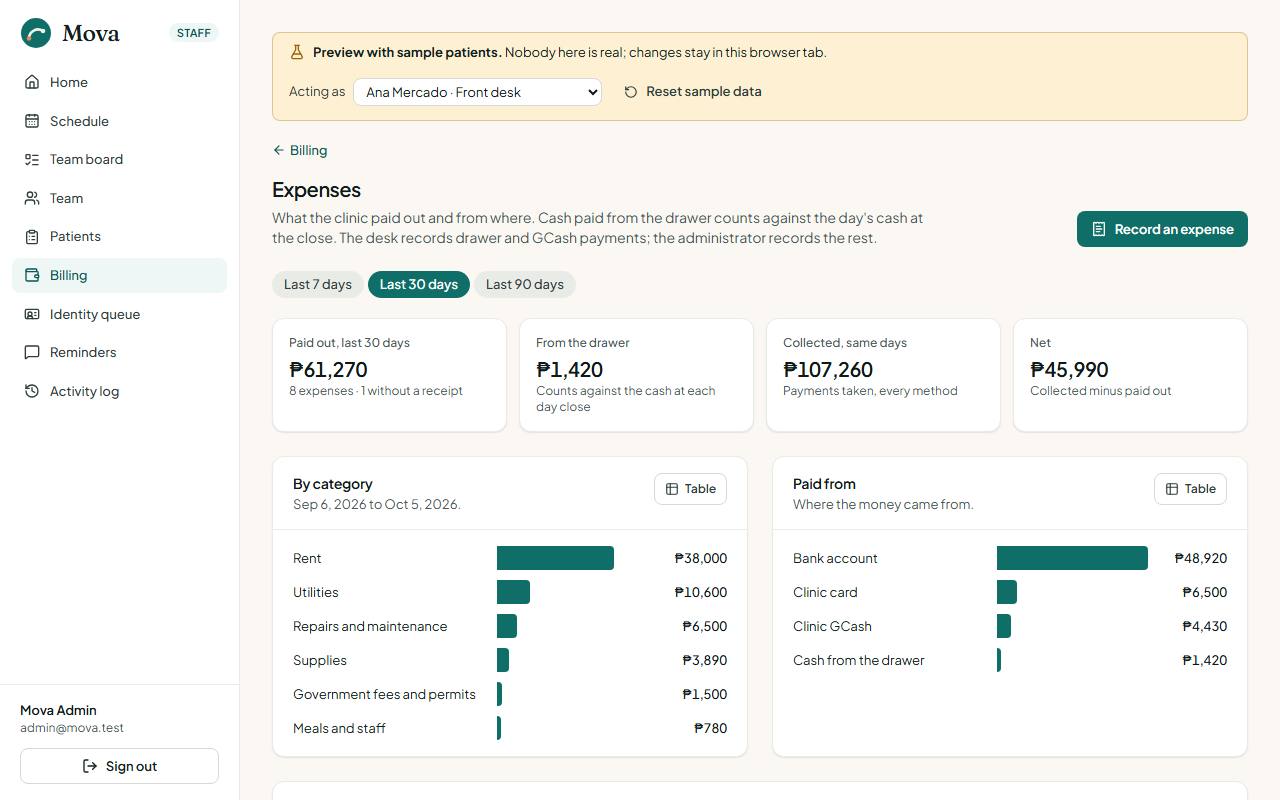
- Choose Record an expense.
- The day, the category (supplies, utilities, rent, equipment, repairs, transport, meals and staff, professional fees, government fees, other), who was paid, what for, and the amount.
- Where it was paid from: the drawer, the bank, the clinic's GCash or card, or the owner. A reference, and whether the receipt is filed.
The desk records payments from the drawer and GCash. The administrator records everything and voids a mistaken entry with a reason; it stays on the list, struck through.
The page shows the period at a glance: paid out, paid from the drawer, collected, and the net, by category and by source.
Supplies
Supplies, from the billing page. The consumables on the shelf: electrodes, gloves, tape, gel.
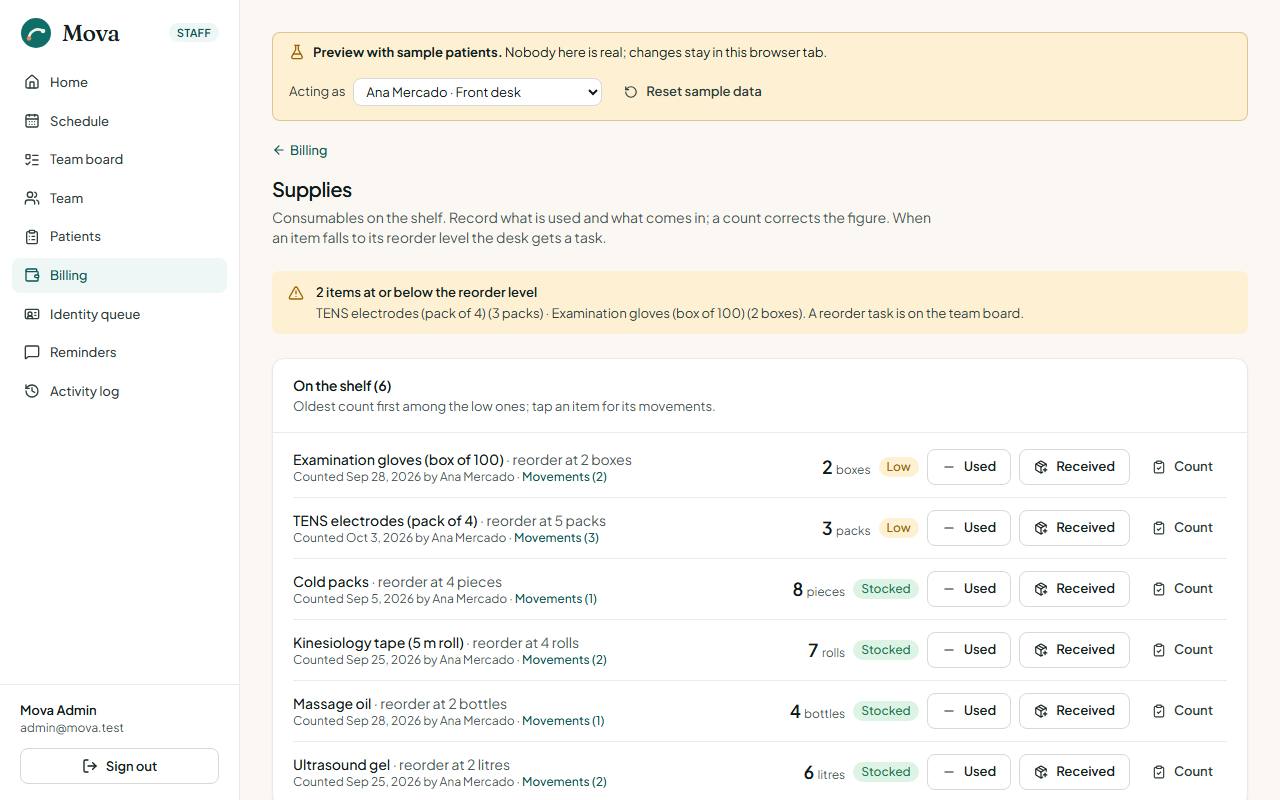
- Each item has a unit, what is on hand, a reorder level, and when it was last counted and by whom.
- Record a movement: received (supplier and invoice in the note), used, wasted or expired.
- Count replaces the figure with what is on the shelf and keeps the difference on the list.
- When an item falls to its reorder level, a Reorder task appears on the board, urgent at zero. Stock received above the level closes it.
The desk and the administrator record movements and counts; the administrator adds new items.
Closing the day
Close the day, from the billing page, at the end of each day.
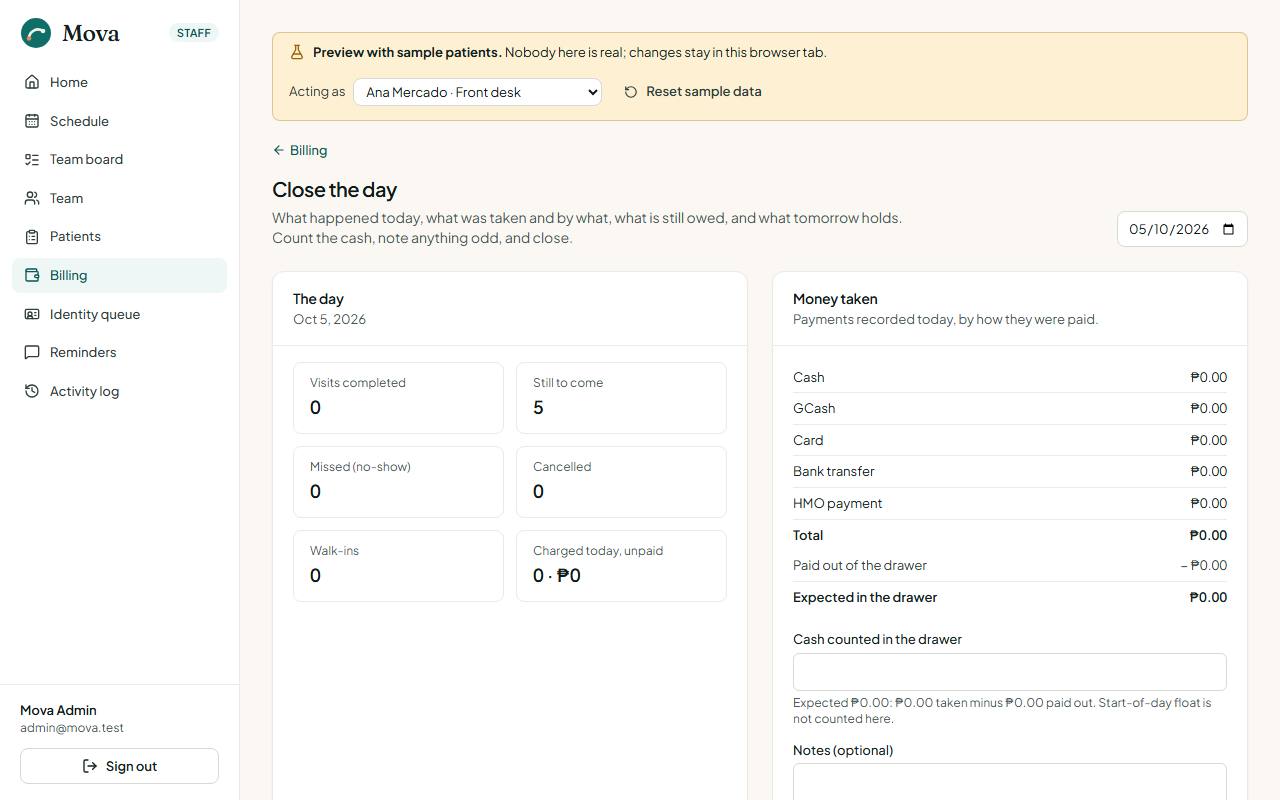
- The day's numbers: visits done, still to come, missed, cancelled, walk-ins, and what was charged today but not paid, with who to chase.
- The money: what was taken by each method. The cash expected is cash taken, minus cash paid out of the drawer for expenses and refunds.
- Count the drawer and enter the cash. The difference shows as balanced, over or short before anything is saved.
- Add notes for the morning shift or the administrator.
- Close the day. The count, the difference and the day's numbers are kept with who closed it and when.
From the same screen, each missed visit can become a task to call the patient tomorrow. Tomorrow shows the appointments per practitioner, the reminders still queued, and who is waiting for a slot.
A closed day can be amended with a reason, which is kept with the close. A drawer expense cannot be recorded against a day already closed. The staff home's Day close tile says whether today is open or closed.