Clinical work
The patient record, starting a session safely, writing and signing notes, prescriptions and home programmes, progress and re-evaluation, completing a course, documents, and the nurse's checks. This page is for physicians, physiotherapists and nurses. The front desk and the administrator do not see clinical content.
Who can do what
| Physician | Physiotherapist | Nurse | |
|---|---|---|---|
| Read the record and notes | Yes | Yes | Yes |
| Write notes | Consultation, progress | Session, progress | No |
| Countersign notes | Yes | No | No |
| Prescribe medicines and therapy | Yes | No | No |
| Acknowledge prescriptions | Yes | Yes | |
| Stop a prescription | Yes | No | No |
| Start and finish sessions | Yes | Yes | No |
| Pre-session check and vital signs | Yes | Yes | Yes |
| Add allergies and precautions | Yes | Yes | Yes |
| Retire allergies and precautions | Yes | Yes | No |
| Issue documents | All three kinds | Treatment summaries | No |
| Complete a course | Yes | Yes | No |
| Review incidents | Yes | No | No |
Finding a patient
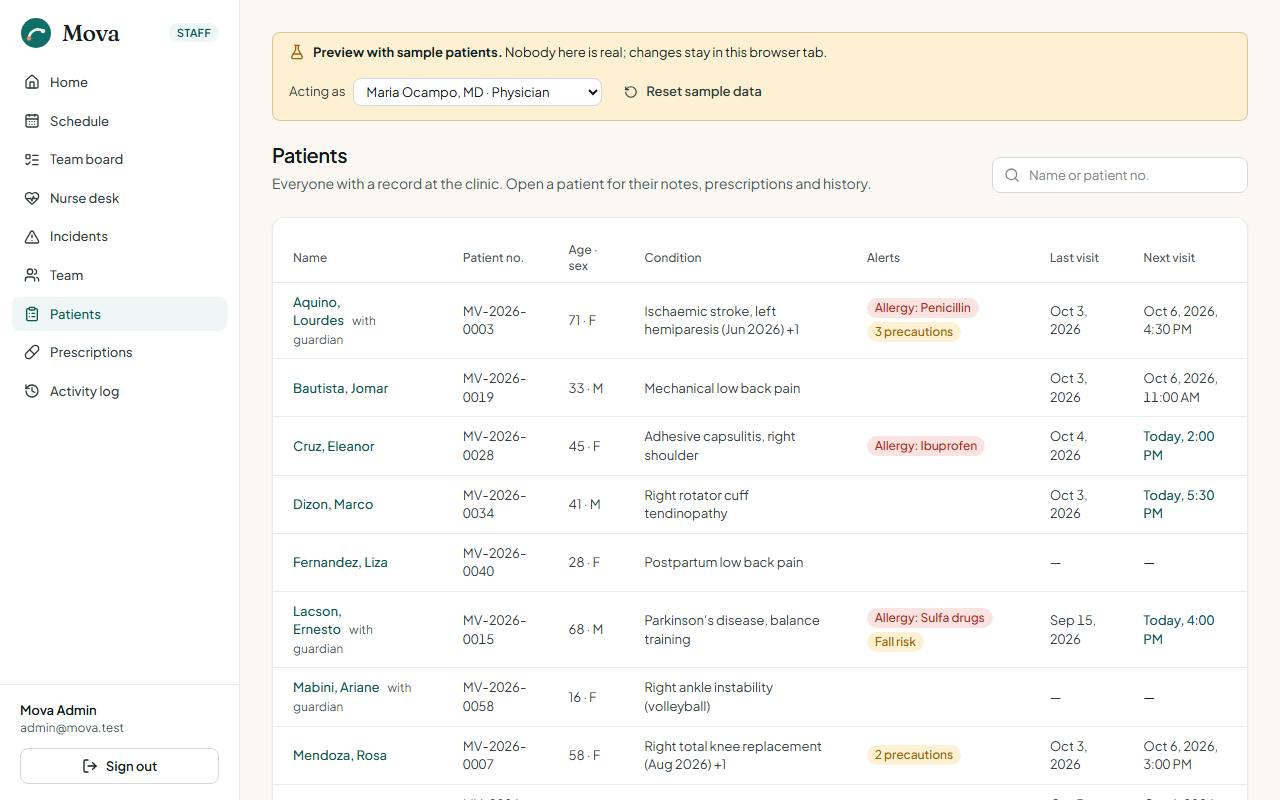
Patients in the menu: search by name or number. The list shows each patient's alerts and today's visits. Opening a record is logged on it.
The patient record
The header
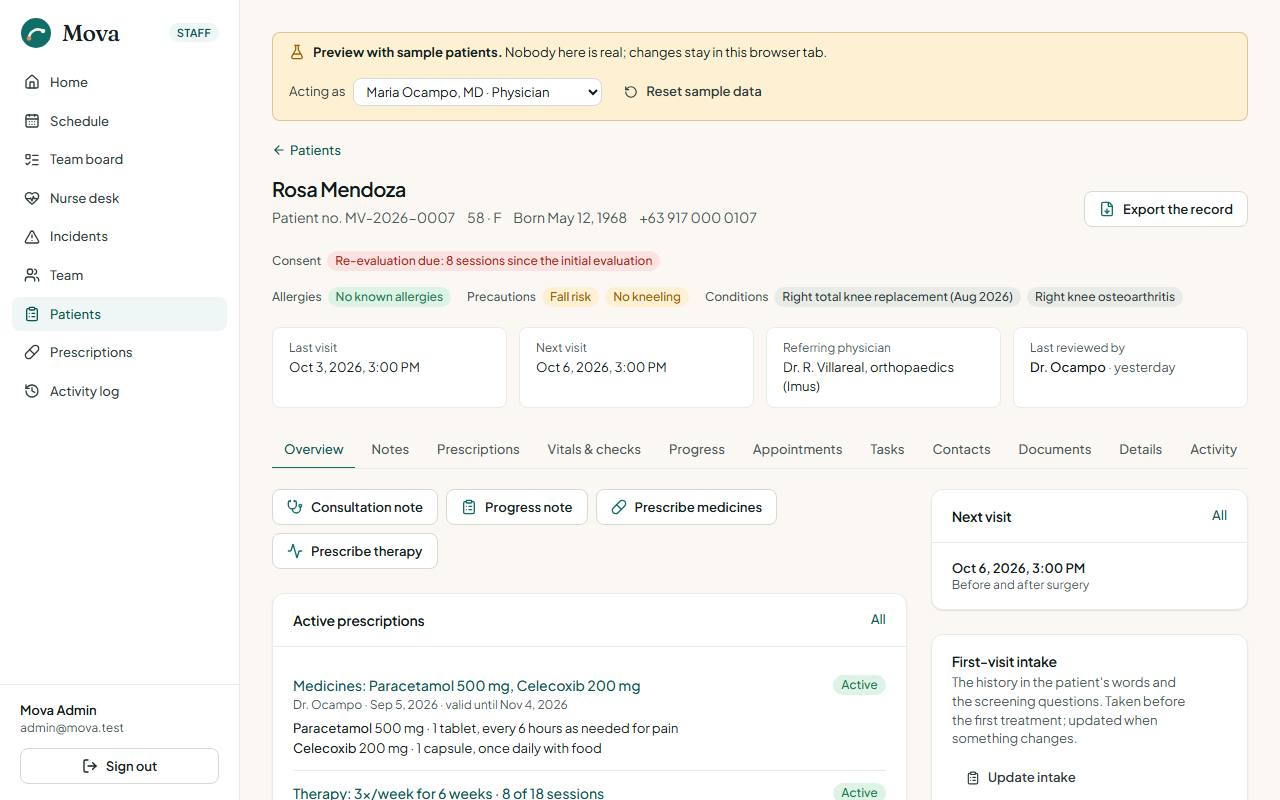
The top of every record, for everyone who opens it, carries what must not be missed:
- Consent warnings: a required consent missing, withdrawn or on older wording, in red.
- Allergies, or "Allergies not asked" until a clinician has asked and recorded the answer.
- Red flags from the intake.
- Re-evaluation due, with how many sessions and days since the last one.
- Who last reviewed the record.
The tabs
| Tab | What is there | Who sees it |
|---|---|---|
| Overview | Active prescriptions, the latest note, what needs attention, allergies, precautions and conditions, the intake, the latest nurse check | Clinicians |
| Notes | Every note, newest first, with its status | Clinicians |
| Prescriptions | Medicines and therapy plans, active and past | Clinicians |
| Vitals & checks | Every pre-session check, vital signs over time, incidents | Clinicians |
| Progress | Pain, range of motion and outcome measures over visits | Clinicians |
| Appointments | Upcoming and past visits, and each course as scheduling facts | Everyone |
| Tasks | Follow-ups about this patient | Everyone |
| Contacts | Calls and messages with the patient | Everyone |
| Documents | Certificates, letters and summaries issued | Everyone |
| Details | Contact details, HMO, discount ID, consents | Everyone |
| Billing | Charges, payments, packages | Desk, administrator |
| Activity | Every opening of the record and every change | Clinicians |
Allergies, precautions and conditions
On the Overview. Each is an entry with who added it, when, where it came from (the patient, the referral, the prescription, or the clinician's own finding) and a note.
- Add one. Nurses, physiotherapists and physicians can add.
- Retire one that no longer applies, with a reason. Only physicians and physiotherapists retire; the entry stays on the past list, struck through.
- No known allergies is an answer you record, not a blank. Until a clinician asks and records it, every clinical screen says "Allergies not asked", and prescribing and the session screen warn.
The first-visit intake
On the Overview: Record intake. The nurse or a clinician records the complaint in the patient's words, when it started and how it has gone, the pain pattern, previous treatment, medicines, past history and the patient's goals.
Eight screening questions follow: night or rest pain, unexplained weight loss, bladder or bowel changes, fever, recent trauma, history of cancer, numbness or weakness, chest pain or breathlessness. A "yes" is a red flag, with a note. Red flags show in the record header and on the session screen. The physician's consultation note starts with the intake already in its history section.
Before the session
When the patient is checked in, the physician or physiotherapist chooses Start in the waiting room. Mova opens Before the session first.
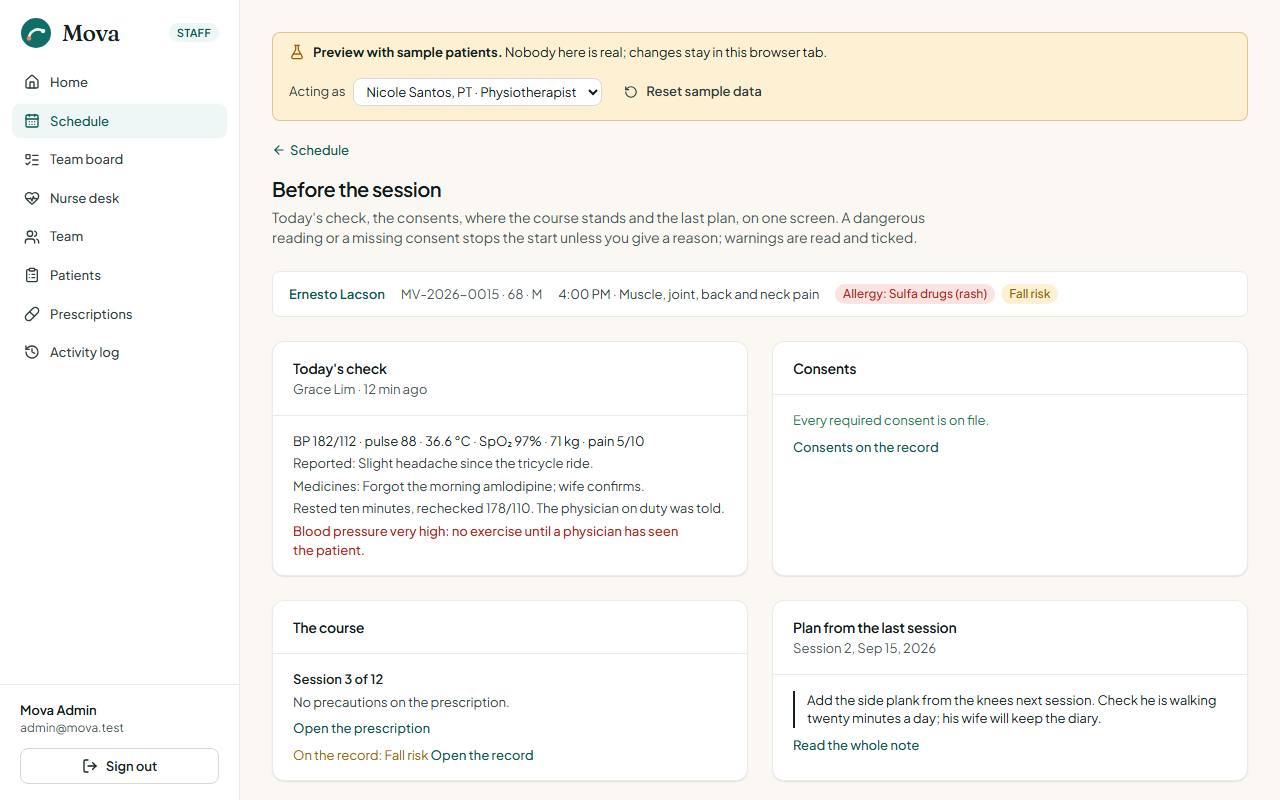
It shows, on one screen:
- Today's nurse check with anything out of range, or that no check was done, with a link to do one.
- The consents, and whether every required one is on file.
- The course: session 6 of 12, its precautions, and whether it was stopped or completed.
- The plan from the last signed note, to pick up where it left off.
- The record's precautions, allergies and red flags.
- Re-evaluation due, if it is.
- Arrived late, if the patient did.
Two kinds of finding:
- Blockers stop the start: a reading that is dangerous for exercise (very high blood pressure, fever, low oxygen), or a required consent missing. Start session stays disabled. Start anyway needs a reason, which is recorded on the record as an override.
- Warnings are read and ticked: a missing check, a stopped or complete course, the precautions, a red flag. Then Start session.
Writing and signing a note
Kinds of note
| Note | Written by | When |
|---|---|---|
| Consultation | Physician | The first assessment, or a new problem |
| Session | Physiotherapist | Each therapy session |
| Progress | Physician or physiotherapist | A re-evaluation with outcome measures |
Writing
Start a note from Before the session (it carries the visit) or from the record's Notes tab. There is one note per visit; arriving at the session twice opens the same note.
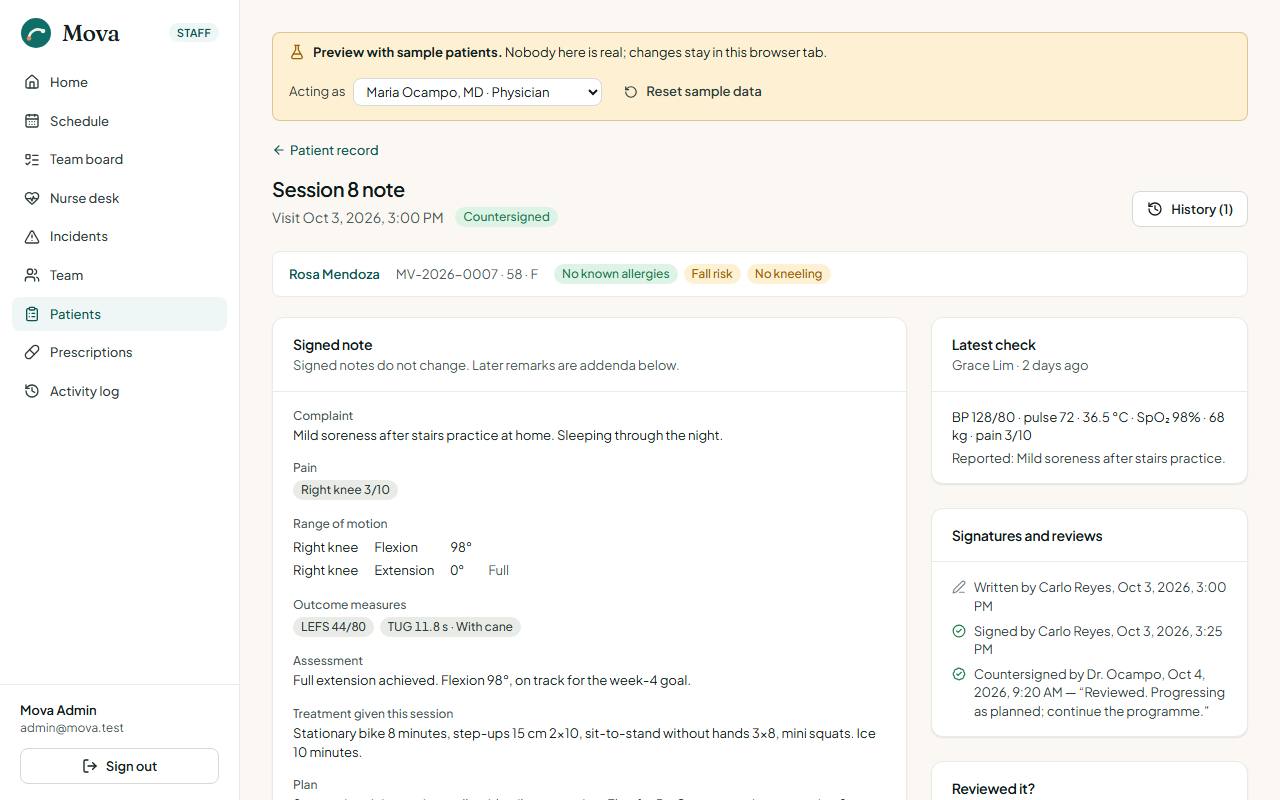
The note has the complaint and history, pain by body site out of 10, range of motion by joint and movement, function, outcome measures (NPRS, PSFS, ODI, NDI, LEFS, DASH, SPADI, TUG, Berg balance, 6-minute walk), the assessment, the treatment given, the plan, and the summary the patient sees, written for them in plain words. It saves as you type.
Starting from the last note
A session or progress note started from Before the session is filled in from the last signed note of the same kind: the pain sites with their scores, the range-of-motion rows with the degrees left blank, the outcome measures, the treatment and the plan. Each carried value shows what it was ("was 5/10") until you change it. One button clears everything carried.
If you sign a note in which nothing was changed from the last one, Mova asks "Nothing changed since session 5?" first, so a copied note needs a deliberate second press. Consultation notes never carry forward.
Signing
Signing seals the note: it can no longer be edited, and its summary reaches the patient's portal. Every version before signing is kept in the note's history. After signing:
- Countersign: a physician countersigns a physiotherapist's note where the clinic needs it. Notes waiting are counted on the physician's home.
- Mark reviewed: a clinician records that they read the note.
- Addendum: something to add after signing goes in an addendum, dated and signed, beneath the note.
Each note shows its trail: written by, last edited by, signed by, countersigned by, reviewed by.
Prescriptions
From the record: Prescribe medicines or Prescribe therapy. Physicians only.
Medicines
Each medicine: generic name (required), brand if any, strength, form, dose, frequency, duration, quantity and instructions. The prescription prints on the clinic's paper with the physician's PRC and PTR numbers, for the pharmacy.
Therapy
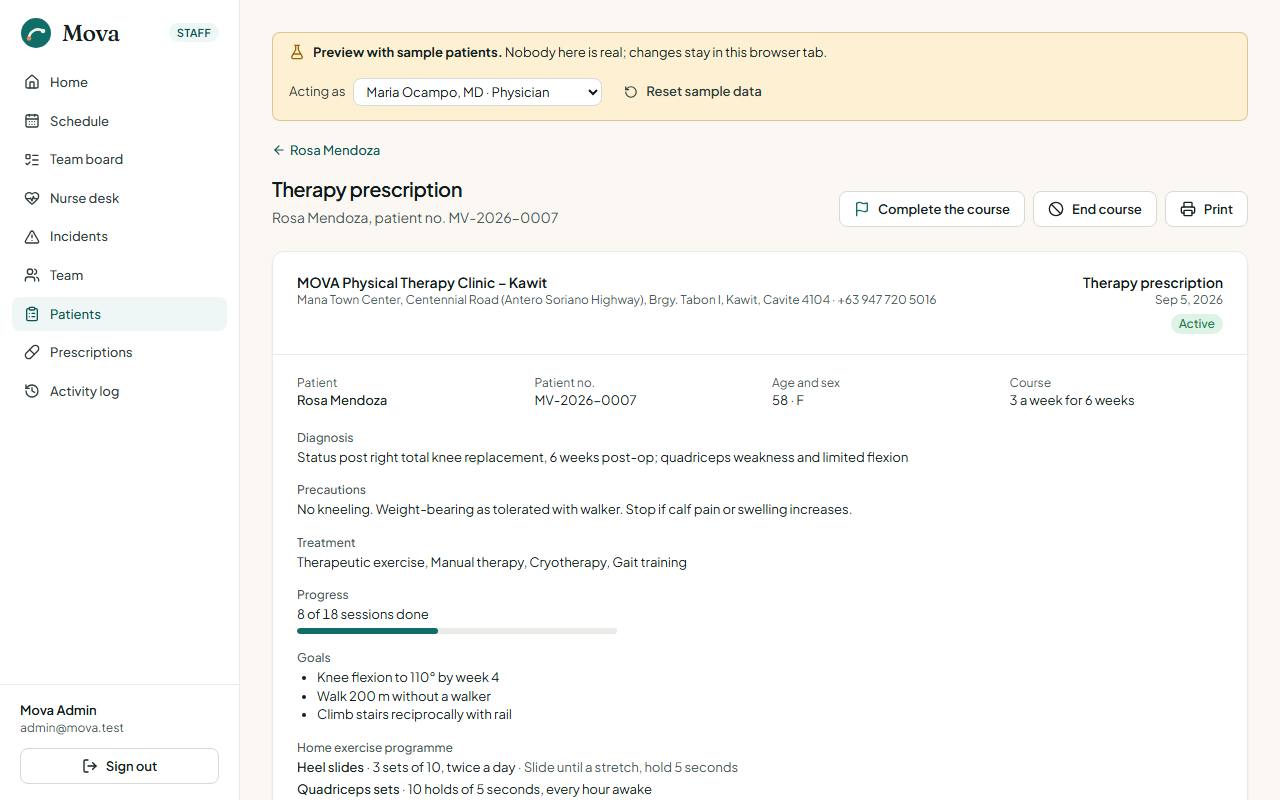
The diagnosis, precautions, modalities (therapeutic exercise, manual therapy, gait and balance training, TENS, ultrasound, heat, cryotherapy and others), sessions a week for how many weeks, the goals, and the home exercise programme: each exercise with its dose and notes.
After prescribing
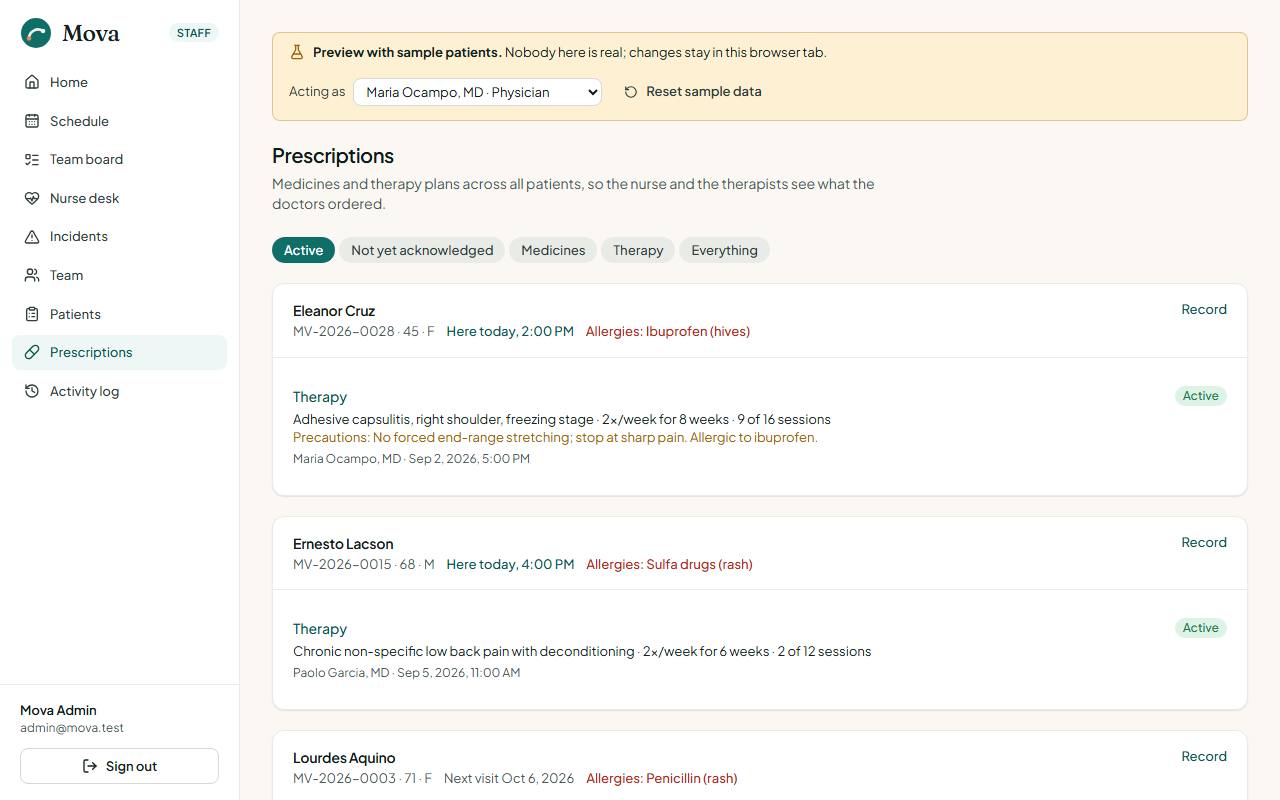
- Prescriptions in the menu lists every prescription across patients, today's patients first. Nurses and physiotherapists acknowledge a new one to say they have seen it.
- The physician can stop a prescription, with a reason. The patient sees in the portal that it was stopped and why.
- The patient sees their medicines and therapy plan in the portal under Your treatment.
The home programme handout
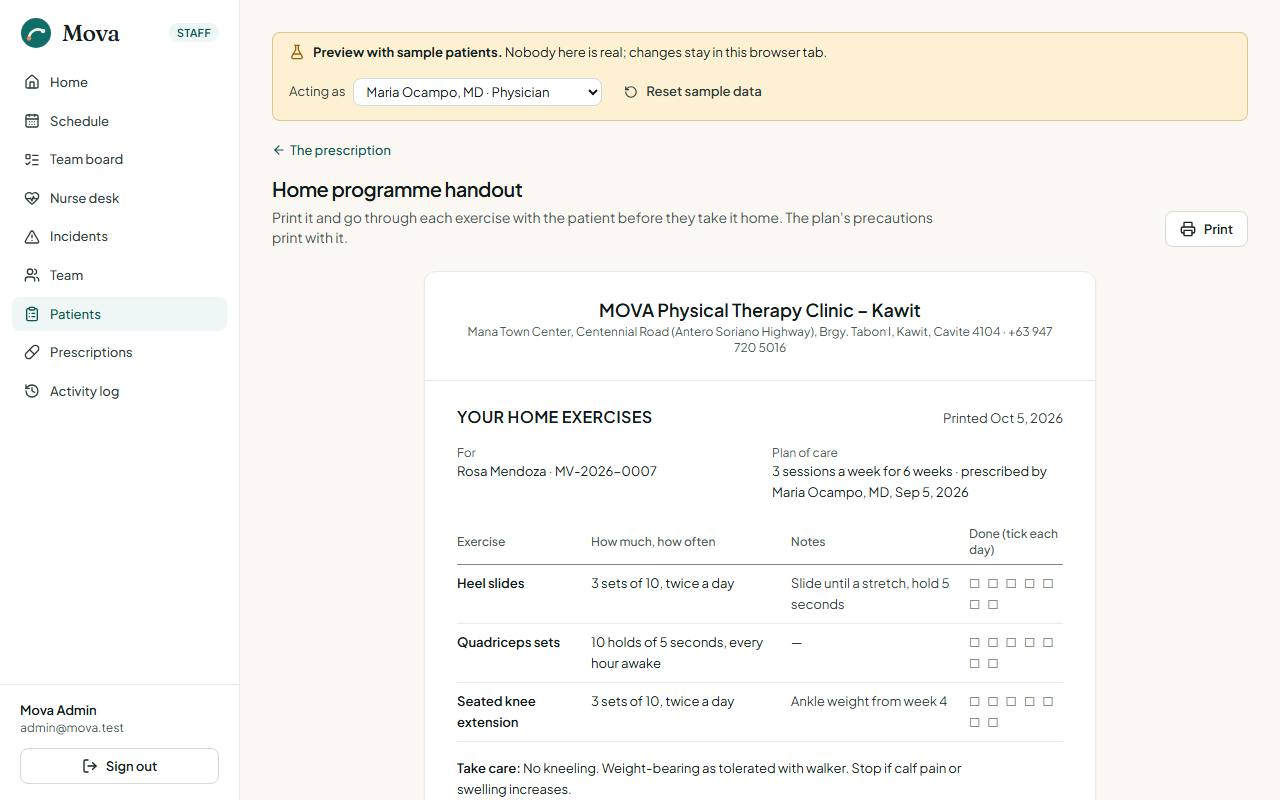
On a therapy prescription, Print the handout puts the home exercises on the clinic's paper: the patient and number, the plan, each exercise with its dose and notes and boxes to tick each day, the precautions, and when to stop and call the clinic. Anyone who can open the prescription can print it, so the desk can hand it over at checkout.
Progress and outcome measures
The record's Progress tab, built from signed notes only.
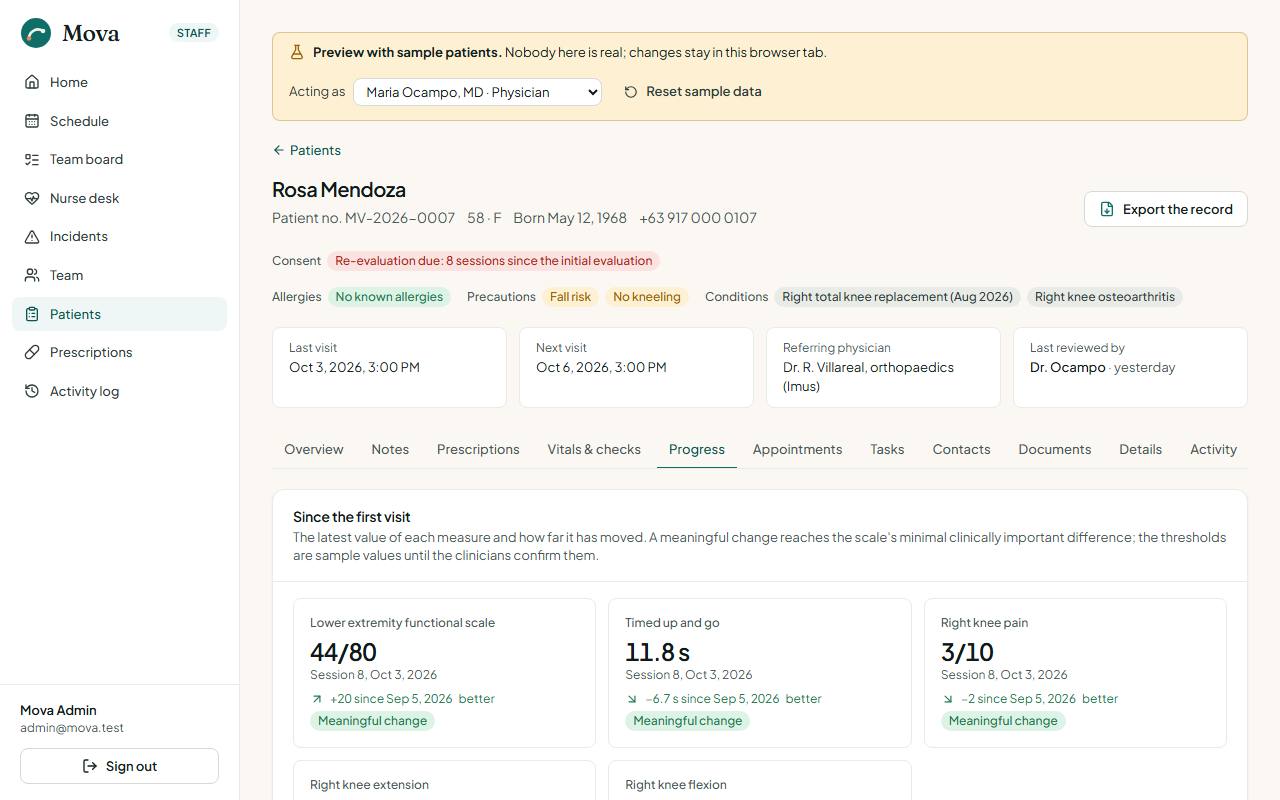
- One tile per measure: the latest value, the change since the first measurement, and whether that is better or worse. Meaningful change marks a change large enough to matter for that scale.
- A chart per measure over visits, with a table view behind every chart.
Re-evaluation
A course of therapy is re-evaluated, with outcome measures and a progress note, every 6 sessions or 30 days, whichever comes first. The administrator can change both numbers in Settings.
- Re-evaluation due shows in the record header for everyone, so the desk can book a longer slot or the physician.
- It is a warning on Before the session.
- The staff home's Due a re-evaluation today tile names today's patients who are due.
- Signing a progress note resets the count.
Completing a course
On the therapy prescription, Complete the course. Physicians and physiotherapists.
- How each goal ended: met, partly met, or not met.
- The discharge summary, which can be filled in from the signed notes and the prescription, then edited.
- What comes next: home programme, a review, back to work or sport.
- Issue a treatment summary is ticked by default: a numbered treatment summary with the same text goes to the patient's portal.
The prescription closes as completed. The patient is asked in the portal how their care went, and reminded once, a week later, if they have not answered.
Documents
From the record's Documents tab: Issue a document.
| Document | Issued by | What it holds |
|---|---|---|
| Medical certificate | Physicians | Diagnosis, findings, the period covered, and unfit, fit for light duties, or fit to return |
| Referral letter | Physicians | To a named clinician: history, findings and what is asked of them |
| Treatment summary | Physicians, physiotherapists | The course, the latest measures and the plan, for a doctor, an insurer or the patient |
- A treatment summary can be filled in from the signed notes and the therapy prescription.
- Each kind is numbered per year: MC-2026-0031, RL-2026-0009, TS-2026-0012. The sheet carries the letterhead, the clinician's name, title, PRC and PTR, and a verification line.
- Printing is logged. The desk and the nurse can open and print issued documents.
- Voiding keeps the document with its number and reason, marked VOID.
- Released to the patient by default, shown in their portal. Untick it for a letter meant only for the receiving clinician.
Exporting a copy of the record
For the patient's own request under the Data Privacy Act, a transfer of care, or an HMO or insurer at the patient's request. From the record, export a copy: the details and HMO, consents, every prescription and course, the progress measures, every signed note with its countersignature and addenda, and the documents issued. Drafts never leave the clinic. Choose the purpose; printing records the export with who, when and why. Physicians, physiotherapists and nurses prepare it.
For nurses
The nurse desk
Nurse desk in the menu.
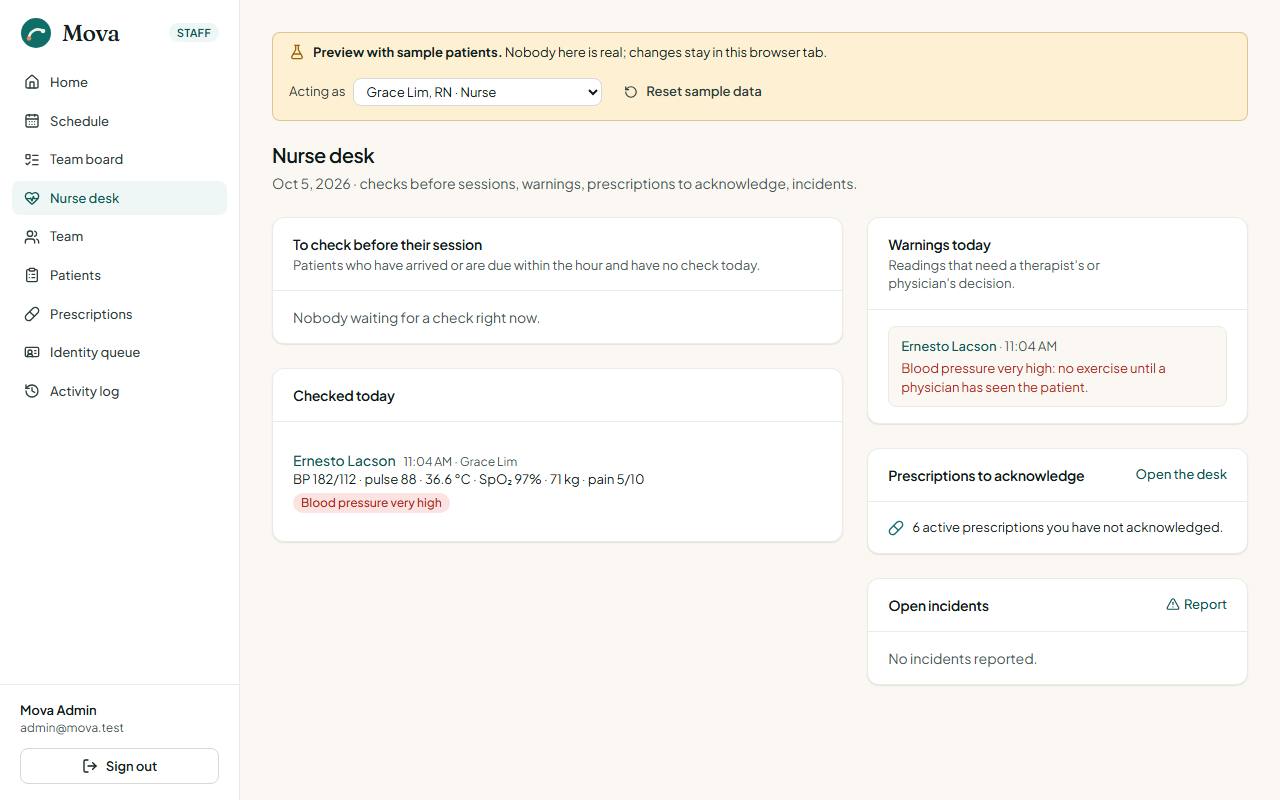
- To check before their session: arrived, in session, or due within the hour, with no check today, with their allergies and precautions.
- The checks done today.
- Warnings that need a therapist's or physician's decision.
- Prescriptions not yet acknowledged.
- Open incidents.
The pre-session check
From the nurse desk or the record. Blood pressure, pulse, temperature, oxygen saturation, weight and pain, then four questions: new symptoms, falls or near-falls, medicine changes, feeling unwell. A note for the therapist.
Warnings appear as you type. A reading that should stop the session saves as flag for the physician: it blocks Start session on Before the session, and the clinician either sees the patient first or starts anyway with a recorded reason. The last check is shown beside it for comparison.
Vital signs over time
The record's Vitals & checks tab: every check in a table, and each vital sign as a chart over the checks that recorded it, with who took each one.